

Billing
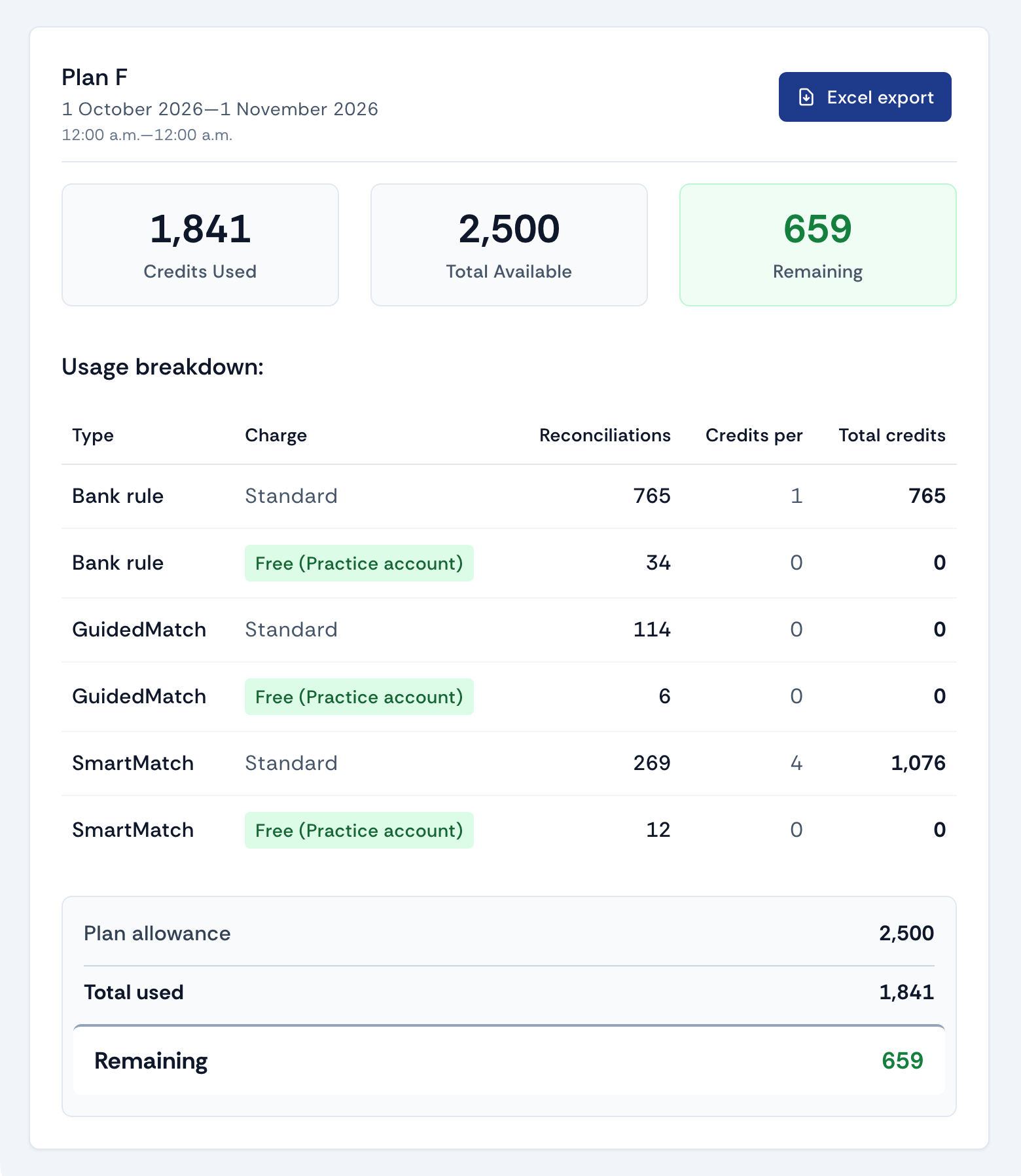
We don’t want to send any surprise bills, so you can see what’s going on with Otto and how much it is costing. The billing page shows how many reconciliations of each type have been made in each billing period and the cost, including any additional usage beyond your plan that will be billed on your next invoice.
Your credits for each period are your plan allowance, plus any Carried over credits from earlier periods, plus any Adjustments, such as credits returned for SmartMatches you’ve reported as incorrect after a period was billed. Unused credits carry over for as long as your subscription is active. The page shows each of these, with the total available, the total used, and what remains.
Detailed usage breakdown
Section titled “Detailed usage breakdown”To help you track and analyse your usage more effectively, you can download a detailed Excel spreadsheet for each billing period. Click the “Excel export” button to download a comprehensive report that breaks down your reconciliations by type, client, and day.
This report is particularly useful for:
- Monitoring which clients are using the most reconciliations
- Understanding usage patterns throughout the month
- Evaluating whether your current plan offers the best value for your practice
The spreadsheet automatically calculates the most cost-effective plan based on your current usage. You can also adjust the figures to forecast future usage and determine the optimal plan as your practice grows.
Changing your plan
Section titled “Changing your plan”You can upgrade or downgrade your plan at any time by clicking Manage Subscription on the billing page. This opens Stripe’s secure billing portal, where you can also update your payment details and view invoices. Only the person who manages your subscription sees the button. Everyone else sees who that is, and can contact support to change it.
Upgrades take effect immediately. You pay the full price difference between your old and new plan, and receive the extra credits right away. Downgrades take effect when your current billing period ends, and your unused credits carry over.
Cancelling your subscription
Section titled “Cancelling your subscription”You can also cancel through Manage Subscription, although we’d be sad to see you go and would love to have the chance to resolve any problems if you aren’t happy with Otto.
A cancellation takes effect when your current billing period ends, and you keep full access to Otto Bank Rec until then. Any extra credits used in that last period are billed on a final invoice, and your unused credits are lost when the subscription ends.
Fixed or uncapped billing
Section titled “Fixed or uncapped billing”You can decide whether you want Otto to stop working when your credits are used up, or if you’d prefer him to carry on and be billed for the extra credits on your next invoice. See fixed or uncapped billing in settings for more details.